The Catalogue for Archival Records of the Legislature ("CAROL") contains information on the records preserved by the Legislative Council (LegCo) Archives.
CAROL is updated regularly when new archival records are acquired and processed.
This "Help" provides general guidance for users to search, reserve and/or order archival records for viewing.
立法機關歷史檔案目錄(以下簡稱 "CAROL")載錄由立法會檔案館保存的檔案的資料。
在蒐集新的歷史檔案和完成整理後,檔案館會定期更新目錄。
這〈說明〉為使用者提供有關搜尋、預約及/或借閱歷史檔案的一般指引。
立法机关历史档案目录(以下简称 "CAROL")载录由立法会档案馆保存的档案的资料。
在搜集新的历史档案和完成整理后,档案馆会定期更新目录。
这〈说明〉为使用者提供有关搜寻、预约及/或借阅历史档案的一般指引。
I. Description of Archival Records
The archival holdings of the LegCo Archives are described according to the General International Standard Archival Description (ISAD(G)) issued by the International Council on Archives.
The descriptive information is grouped under seven hierarchical levels: FONDS, SUB-FONDS, SERIES, SUB-SERIES, DEPOSIT, FILE and ITEM with hierarchical relationship built between them (see the following figure for illustration).
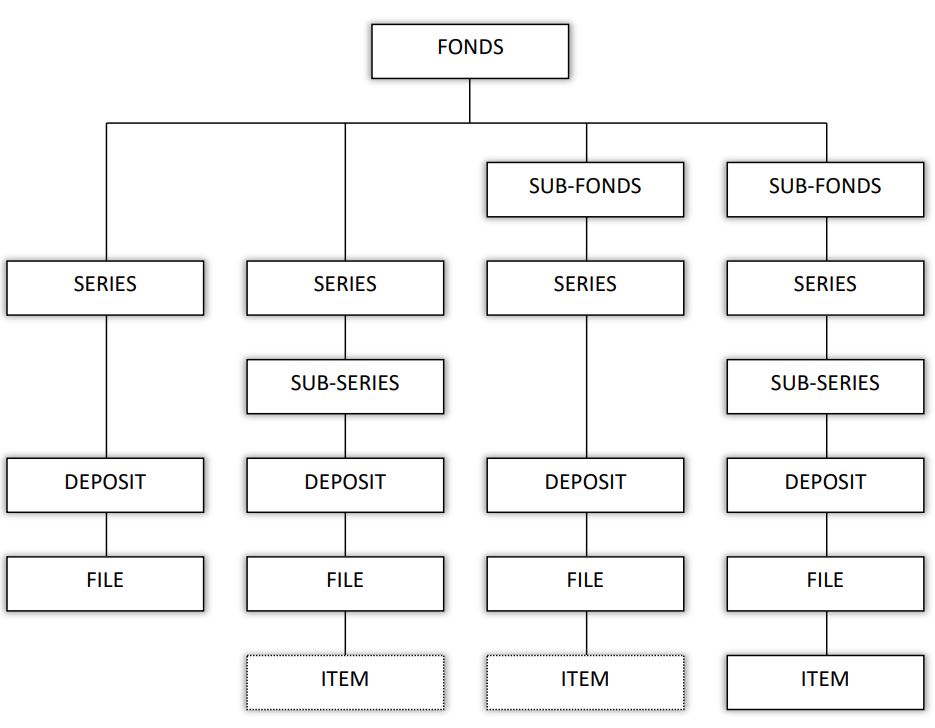
Archival description proceeds from the general to the specific and commences at the top to the lower levels.
Information at the FONDS, SUB-FONDS, SERIES, SUB-SERIES and DEPOSIT levels is more general than the FILE or ITEM level.
Information at the higher levels provides the context for the lower ones and helps users understand and interpret the content of a file or item.
Information about connected records and material is also given at higher levels.
Users can navigate through the different descriptive levels in CAROL for information relating to the content and context of archival records.
Users looking for descriptive information at a particular level may use Advanced Search for the desired result.
I. 歷史檔案的著錄
立法會歷史檔案館的館藏是按照國際檔案理事會制定的國際歷史檔案著錄通用標準(ISAD(G))來著錄。
檔案的著錄資料分為七個層次:全宗、次全宗、類別、次類別、移交次、案卷及文件,各著錄層次間存在層級關係(見下圖)。
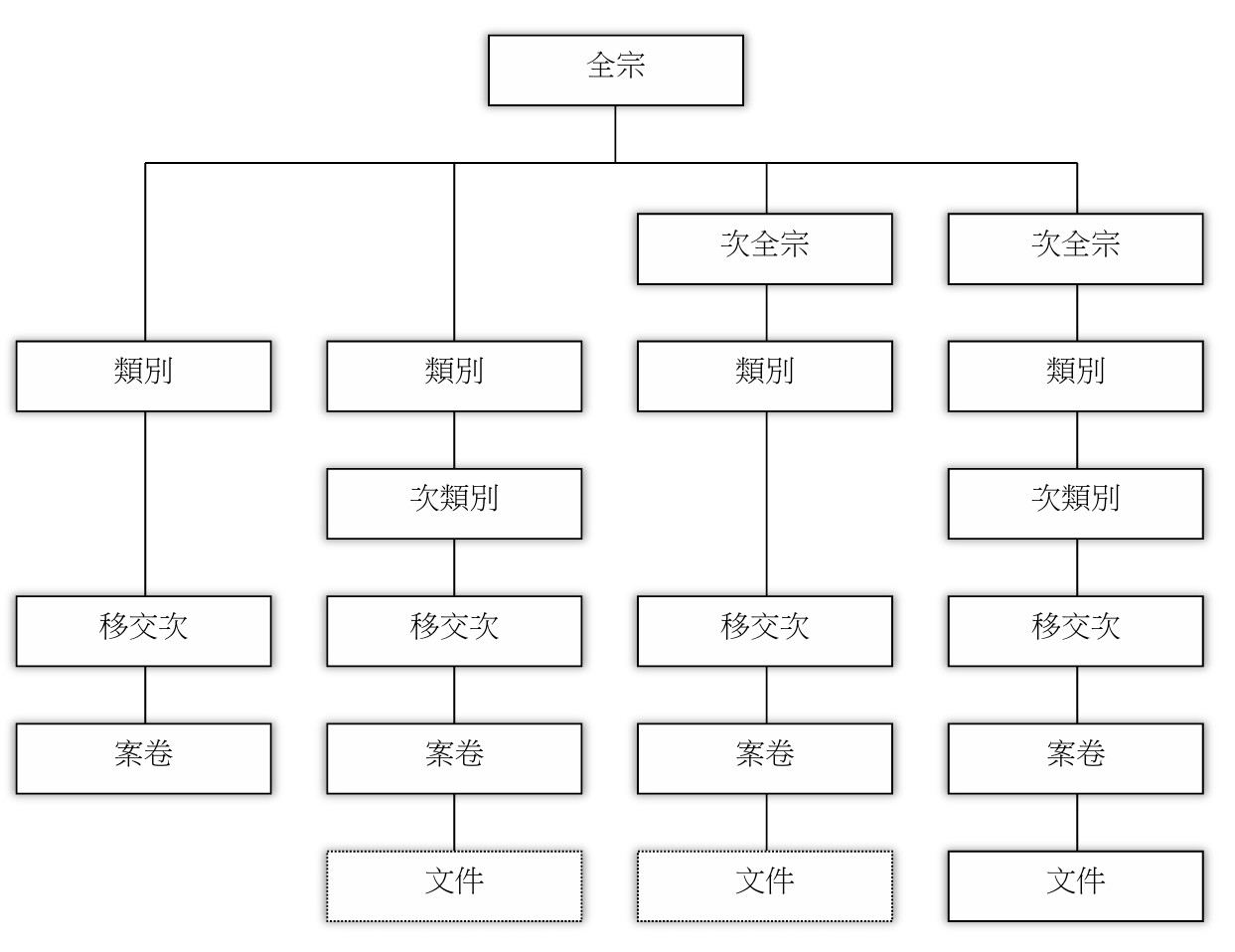
歷史檔案的著錄資料由概括至具體,著錄工作則由最高的層次開始,一直延伸至較低層次。
全宗、次全宗、類別、次類別及移交次等著錄層次的資料比案卷及文件的層次概括。
較高的著錄層次會為較低層次提供脈絡資料,幫助使用者了解案卷及文件的內容。
相關檔案和資料的信息亦會在較高的層次提供。
使用者可在CAROL內不同著錄層次間穿梭瀏覽有關歷史檔案的內容和脈絡資料。
使用者如欲找尋某特定著錄層次的資料,可使用進階搜尋。
I. 历史档案的著录
立法会历史档案馆的馆藏是按照国际档案理事会制定的国际历史档案著录通用标准(ISAD(G))来著录。
档案的著录资料分为七个层次:全宗、次全宗、类别、次类别、移交次、案卷及文件,各著录层次间存在层级关系(见下图)。
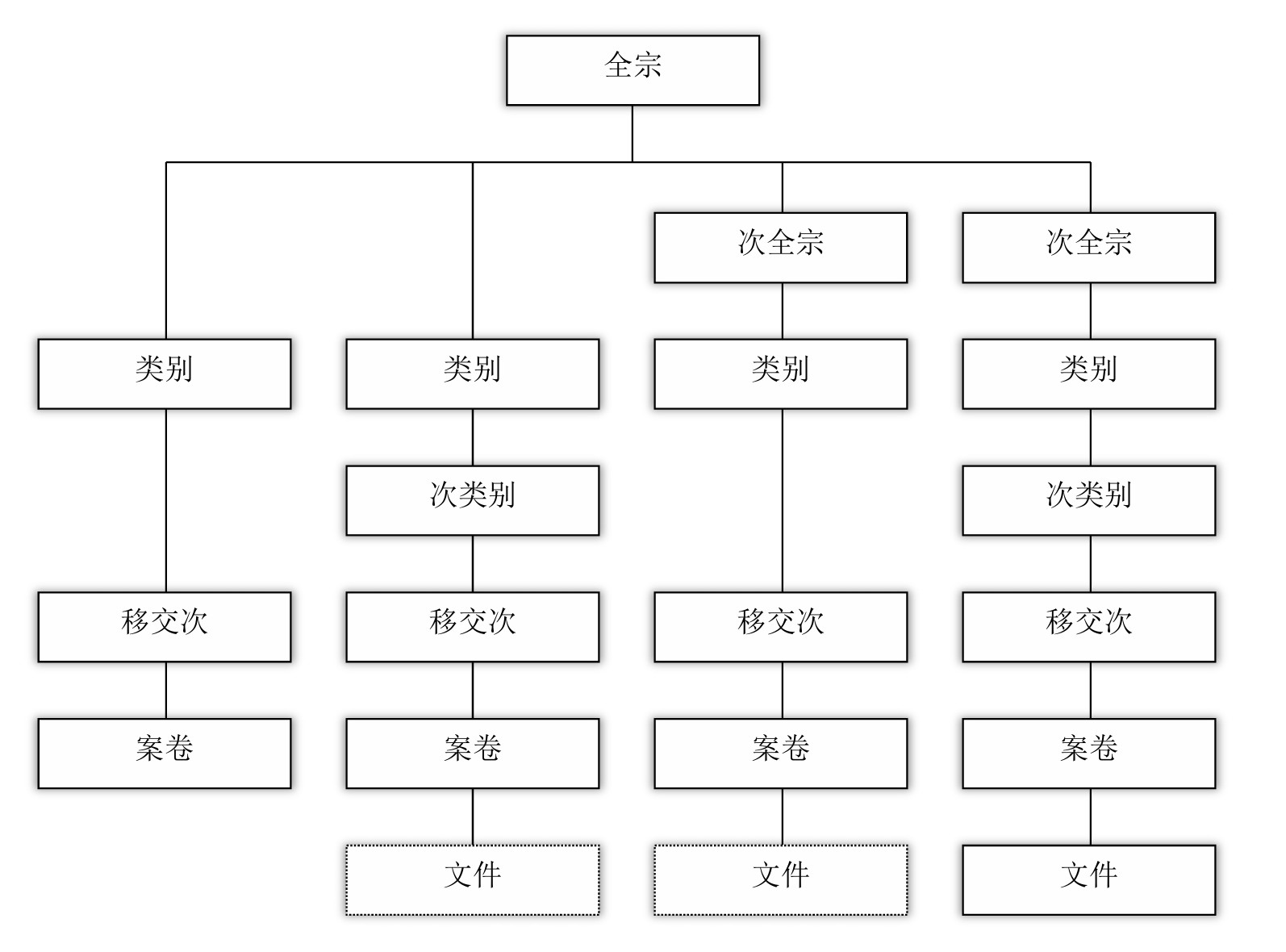
历史档案的著录资料由概括至具体,著录工作则由最高的层次开始,一直延伸至较低层次。
全宗、次全宗、类别、次类别及移交次等著录层次的资料比案卷及文件的层次概括。
较高的著录层次会为较低层次提供脉络资料,帮助使用者了解案卷及文件的内容。
相关档案和资料的信息亦会在较高的层次提供。
使用者可在CAROL内不同著录层次间穿梭浏览有关历史档案的内容和脉络资料。
使用者如欲找寻某特定著录层次的资料,可使用进阶搜寻。
II. Search Options
CAROL provides two ways to search the database of archival records:
a. General Information about Search
(1) To provide more relevant Search Results and faster response time, the system has filtered out prepositions, articles and words with broad or non-specific meaning according to a stop word list.
(2) Any word(s) and phrase(s) typed in the search box(es) will lead to a search of information in the following text fields:
- (a) Titles, including former title and Chinese titles (if any) of FONDS, SUB-FONDS, SERIES, SUB-SERIES, DEPOSIT, FILE and ITEM;
- (b) Names of the records creators and the immediate source of acquisition (records transferring agencies);
- (c) Administrative or biographical history of the records creators; and
- (d) Content description of FONDS, SUB-FONDS, SERIES, SUB-SERIES, DEPOSIT, FILE and ITEM.
(3) Upper/lower case of word typed does not affect Search Results. Users may enter "report", "Report" or "REPORT" as a search term to produce the same search result.
(4) The system allows Boolean operators "AND" or "OR" to combine keywords, and exact phrase searching.
a. 搜尋一般須知
(1) 為了提供更貼切和快捷的搜尋結果,本系統依據停用詞表,將介詞、冠詞、字義廣泛和沒有特定含意的字詞過濾。
(2) 系統會按照在搜尋欄輸入的任何字詞和語句,搜尋下列的文本檢索項:
- (a) 標題,包括全宗、次全宗、類別、次類別、移交次、案卷及文件的原有標題和中文標題(如有);
- (b) 產生檔案單位和直接收集來源(移交檔案單位)的名稱;
- (c) 產生檔案單位的行政歷史/傳略;及
- (d) 全宗、次全宗、類別、次類別、移交次、案卷及文件的內容描述。
(3) 輸入英文的大寫或小寫不會影響搜尋結果。使用者如輸入"report"、"Report"、"REPORT" 為檢索詞,搜尋結果皆一樣。
(4) 本系統支援使用者使用布林邏輯運算元 "AND" 或 "OR" 以結合關鍵字和完整詞組進行搜尋。
a. 搜寻一般须知
(1) 为了提供更贴切和快捷的搜寻结果,本系统依据停用词表,将介词、冠词、字义广泛和没有特定含意的字词过滤。
(2) 系统会按照在搜寻栏输入的任何字词和语句,搜寻下列的文本检索项:
- (a) 标题,包括全宗、次全宗、类别、次类别、移交次、案卷及文件的原有标题和中文标题(如有);
- (b) 产生档案单位和直接收集来源(移交档案单位)的名称;
- (c) 产生档案单位的行政历史/传略;及
- (d) 全宗、次全宗、类别、次类别、移交次、案卷及文件的内容描述。
(3) 输入英文的大写或小写不会影响搜寻结果。使用者如输入"report"、"Report"、"REPORT" 为检索词,搜寻结果皆一样。
(4) 本系统支援使用者使用布林逻辑运算元 "AND" 或 "OR" 以结合关键字和完整词组进行搜寻。
b. Simple Search
Type a single or multiple keywords or name, with or without year range and/or reference number in the relevant search box(es) to search archival records.
b. 簡易搜尋
在相關的檢索欄輸入一個或多個關鍵字,可同時輸入,亦可留空涵蓋年份及/或參考編號搜尋歷史檔案。
b. 简易搜寻
在相关的检索栏输入一个或多个关键字,可同时输入,亦可留空涵盖年份及/或参考编号搜寻历史档案。
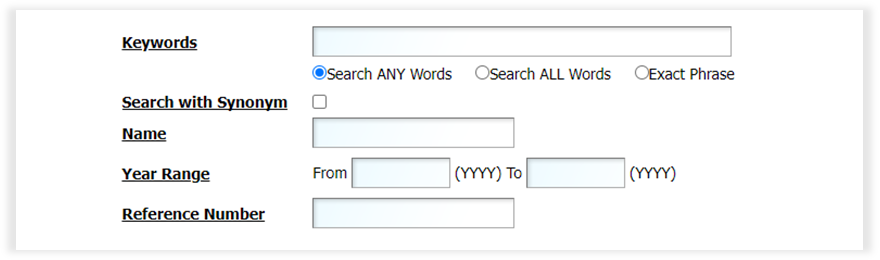
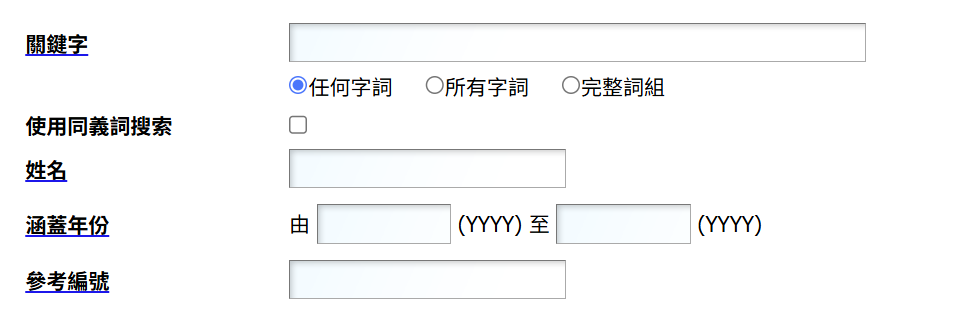
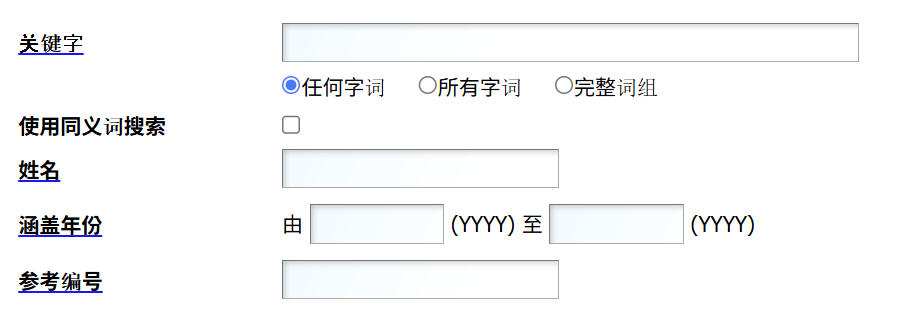
(1) Keywords Search (1) 關鍵字搜尋 (1) 关键字搜寻
Search Field Instructions 搜尋欄說明 搜寻栏说明
| Field Name 欄位名稱 栏位名称 | Search Instructions 搜尋說明 搜寻说明 |
|---|---|
| Search ANY words 任何字詞 任何字词 |
User can enter one word or more than one word in this search box.
If searching one single word, search results will find record(s) containing the
word entered and its variant forms in the indexed fields. For example, enter report,
records containing 'reports', 'reported' and 'reporting', etc. will be displayed.
If searching more than one word such as council meeting, search results will find
record(s) containing 'council', 'meeting' or 'council meeting' as well as their variant forms
including 'councils', 'councilor', 'councilors', 'meetings', 'pre-meeting', 'pre-meetings',
'councilor's pre-meeting', etc. in the indexed fields.
|
| Search ALL words 所有字詞 所有字词 |
User can enter one word or more than one word in this search box.
Search results will find record(s) containing all the words entered and their variant forms in
the indexed fields. For example, enter audit report, records containing 'audit
report', 'audit reports', 'report audited' and 'reports audited', etc. will be displayed.
|
| Exact Phrase 完整詞組 完整词组 |
User can enter one word or more than one word in this search box.
Search results will find record(s) containing the word(s) in exact spelling and order as
entered. For example, enter establishment subcommittee, records containing
'establishment subcommittee' in the indexed field will be displayed. Records including words such
as 'establishment subcommittees', 'establishment sub-committee' or 'subcommittee establishment',
etc. will not be shown.
|
(2) Search with Synonym
User can activate Search with Synonym by ticking the next to it and enter one word, more than one word or an abbreviation.
For example, enter Provisional Legislative Council in the Keywords search box, search results will find the matching synonyms. Records containing 'Provisional Legislative Council', 'PLC' and 'Provisional LegCo' will be displayed.
(2) 使用同義詞搜索
使用者可勾選使用同義詞搜索欄旁的方格,並輸入一個或以上的字或縮寫,來啟動該搜索功能。
例如輸入 Provisional Legislative Council,搜尋結果會尋找其同義詞而顯示包括 ‘Provisional Legislative Council’、 ‘PLC’ 及 ‘Provisional LegCo’ 的檔案。
(2) 使用同义词搜索
使用者可勾选使用同义词搜索栏旁的方格,并输入一个或以上的字或缩写,来启动该搜索功能。
例如输入 Provisional Legislative Council,搜寻结果会寻找其同义词而显示包括 ‘Provisional Legislative Council’、 ‘PLC’ 及 ‘Provisional LegCo’ 的档案。
(3) Name Search
Enter name, e.g. margaret in the Name search box will lead to a search of records with the exact word ‘margaret’.
Enter margaret ng will lead to a search of ‘margaret’, ‘ng’ or ‘margaret ng’.
Users who wish to search the exact name ‘margaret ng’ should enter margaret ng in the Keywords search box and select “Exact Phrase”.
(3) 姓名搜尋
在姓名搜尋欄輸入 margaret,系統會搜尋包含 ‘margaret’ 一字的檔案;輸入 margaret ng 詞組,系統會搜尋包含 ‘margaret’ 或 ‘ng’ 或 ‘margaret ng’ 的檔案。
使用者如欲搜尋完整詞組 ‘margaret ng’,可於關鍵字搜尋欄選擇 "完整詞組",然後輸入 margaret ng。
(3) 姓名搜寻
在姓名搜寻栏输入 margaret,系统会搜寻包含 ‘margaret’ 一字的档案;输入 margaret ng 词组,系统会搜寻包含 ‘margaret’ 或 ‘ng’ 或 ‘margaret ng’ 的档案。
使用者如欲搜寻完整词组 ‘margaret ng’,可于关键字搜寻栏选择 "完整词组",然后输入 margaret ng。
(4) Year Range (4) 涵蓋年份 (4) 涵盖年份
- (a) Enter the years, e.g. 1990(YYYY) and 2001(YYYY) in the From and To search boxes respectively will lead to a search of records created between the year range specified. (a) 輸入年份,例如 由 1990(YYYY)至2001(YYYY),系統會搜尋產生於所輸入的涵蓋年份間的檔案。 (a) 输入年份,例如 由 1990(YYYY)至2001(YYYY),系统会搜寻产生于所输入的涵盖年份间的档案。
- (b) Users can enter the year only in the (b) 使用者可只在 (b) 使用者可只在 search box which will lead to a search of records created in or after that year. 一欄輸入年份,系統會搜尋產生於該年份或之後的檔案。 一栏输入年份,系统会搜寻产生于该年份或之后的档案。
- (c) Enter the year only in the (c) 使用者可只在 (c) 使用者可只在 search box will lead to a search of records created in or before that year. 一欄輸入年份,系統會搜尋產生於該年份或之前的檔案。 一栏输入年份,系统会搜寻产生于该年份或之前的档案。
(5) Reference Number
Users can enter a reference number whether it is alphabetic (not case sensitive), numeric or alphanumeric to conduct a record search. The reference number maybe:
- (a) The code assigned to a record prior to its transfer to the LegCo Archives, e.g.: Reference number for a specific file is MB/CS/9.
- (b) The code assigned by the LegCo Archives to a record at any level either in the LegCo Archives Series (LAS) or the LegCo Manuscript Series (LMS), e.g.:
LegCo Archives Series (LAS)
| Reference No. | Level |
|---|---|
| AF1 | (FONDS level) |
| ASF1 | (SUB-FONDS level) |
| LAS1 | (SERIES level) |
| LASS1 | (SUB-SERIES level) |
| LAS1/1 | (DEPOSIT level directly under SERIES level) |
| LASS1/1 | (DEPOSIT level directly under SUB-SERIES level) |
| LAS1/1/1 | (FILE level directly under SERIES-DEPOSIT levels) |
| LASS1/1/1 | (FILE level directly under SUB-SERIES-DEPOSIT levels) |
| LAS1/1/1/1 | (ITEM level directly under SERIES-DEPOSIT-FILE levels) |
| LASS1/1/1/1 | (ITEM level directly under SUB-SERIES-DEPOSIT-FILE levels) |
LegCo Manuscript Series (LMS)
| Reference No. | Level |
|---|---|
| MC1 | (FONDS level) |
| MSC1 | (SUB-FONDS level) |
| LMS1 | (SERIES level) |
| LMSS1 | (SUB-SERIES level) |
| LMS1/1 | (DEPOSIT level directly under SERIES level) |
| LMSS1/1 | (DEPOSIT level directly under SUB-SERIES level) |
| LMS1/1/1 | (FILE level directly under SERIES-DEPOSIT levels) |
| LMSS1/1/1 | (FILE level directly under SUB-SERIES-DEPOSIT levels) |
| LMS1/1/1/1 | (ITEM level directly under SERIES-DEPOSIT-FILE levels) |
| LMSS1/1/1/1 | (ITEM level directly under SUB-SERIES-DEPOSIT-FILE levels) |
(5) 參考編號
使用者可輸入檔案的參考編號來搜尋檔案,不管該編號是英文字母(不分大小寫)、數字或字母數字。檔案的參考編號可以是:
- (a) 檔案於移交立法會檔案館前的原有代號,例如:MB/CS/9。
- (b) 由立法會檔案館根據檔案所屬的著錄層次而編配的檔案代號;該代號分為立法會歷史檔案類別(LAS)或立法會私人手稿類別(LMS)兩類,例如:
立法會歷史檔案類別(LAS)
| 參考編號 | 層次 |
|---|---|
| AF1 | (全宗層次) |
| ASF1 | (次全宗層次) |
| LAS1 | (類別層次) |
| LASS1 | (次類別層次) |
| LAS1/1 | (移交次層次直屬類別層次) |
| LASS1/1 | (移交次層次直屬次類別層次) |
| LAS1/1/1 | (案卷層次直屬類別–移交次層次) |
| LASS1/1/1 | (案卷層次直屬次類別–移交次層次) |
| LAS1/1/1/1 | (文件層次直屬類別–移交次–案卷層次) |
| LASS1/1/1/1 | (文件層次直屬次類別–移交次–案卷層次) |
立法會私人手稿類別(LMS)
| 參考編號 | 層次 |
|---|---|
| MC1 | (全宗層次) |
| MSC1 | (次全宗層次) |
| LMS1 | (類別層次) |
| LMSS1 | (次類別層次) |
| LMS1/1 | (移交次層次直屬類別層次) |
| LMSS1/1 | (移交次層次直屬次類別層次) |
| LMS1/1/1 | (案卷層次直屬類別–移交次層次) |
| LMSS1/1/1 | (案卷層次直屬次類別–移交次層次) |
| LMS1/1/1/1 | (文件層次直屬類別–移交次–案卷層次) |
| LMSS1/1/1/1 | (文件層次直屬次類別–移交次–案卷層次) |
(5) 参考编号
使用者可输入档案的参考编号来搜寻档案,不管该编号是英文字母(不分大小写)、数字或字母数字。档案的参考编号可以是:
- (a) 档案于移交立法会档案馆前的原有代号,例如:MB/CS/9。
- (b) 由立法会档案馆根据档案所属的著录层次而编配的档案代号;该代号分为立法会历史档案类别(LAS)或立法会私人手稿类别(LMS)两类,例如:
立法会历史档案类别(LAS)
| 参考编号 | 层次 |
|---|---|
| AF1 | (全宗层次) |
| ASF1 | (次全宗层次) |
| LAS1 | (类别层次) |
| LASS1 | (次类别层次) |
| LAS1/1 | (移交次层次直属类别层次) |
| LASS1/1 | (移交次层次直属次类别层次) |
| LAS1/1/1 | (案卷层次直属类别–移交次层次) |
| LASS1/1/1 | (案卷层次直属次类别–移交次层次) |
| LAS1/1/1/1 | (文件层次直属类别–移交次–案卷层次) |
| LASS1/1/1/1 | (文件层次直属次类别–移交次–案卷层次) |
立法会私人手稿类别(LMS)
| 参考编号 | 层次 |
|---|---|
| MC1 | (全宗层次) |
| MSC1 | (次全宗层次) |
| LMS1 | (类别层次) |
| LMSS1 | (次类别层次) |
| LMS1/1 | (移交次层次直属类别层次) |
| LMSS1/1 | (移交次层次直属次类别层次) |
| LMS1/1/1 | (案卷层次直属类别–移交次层次) |
| LMSS1/1/1 | (案卷层次直属次类别–移交次层次) |
| LMS1/1/1/1 | (文件层次直属类别–移交次–案卷层次) |
| LMSS1/1/1/1 | (文件层次直属次类别–移交次–案卷层次) |
c. Advanced Search c. 進階搜尋 c. 进阶搜寻
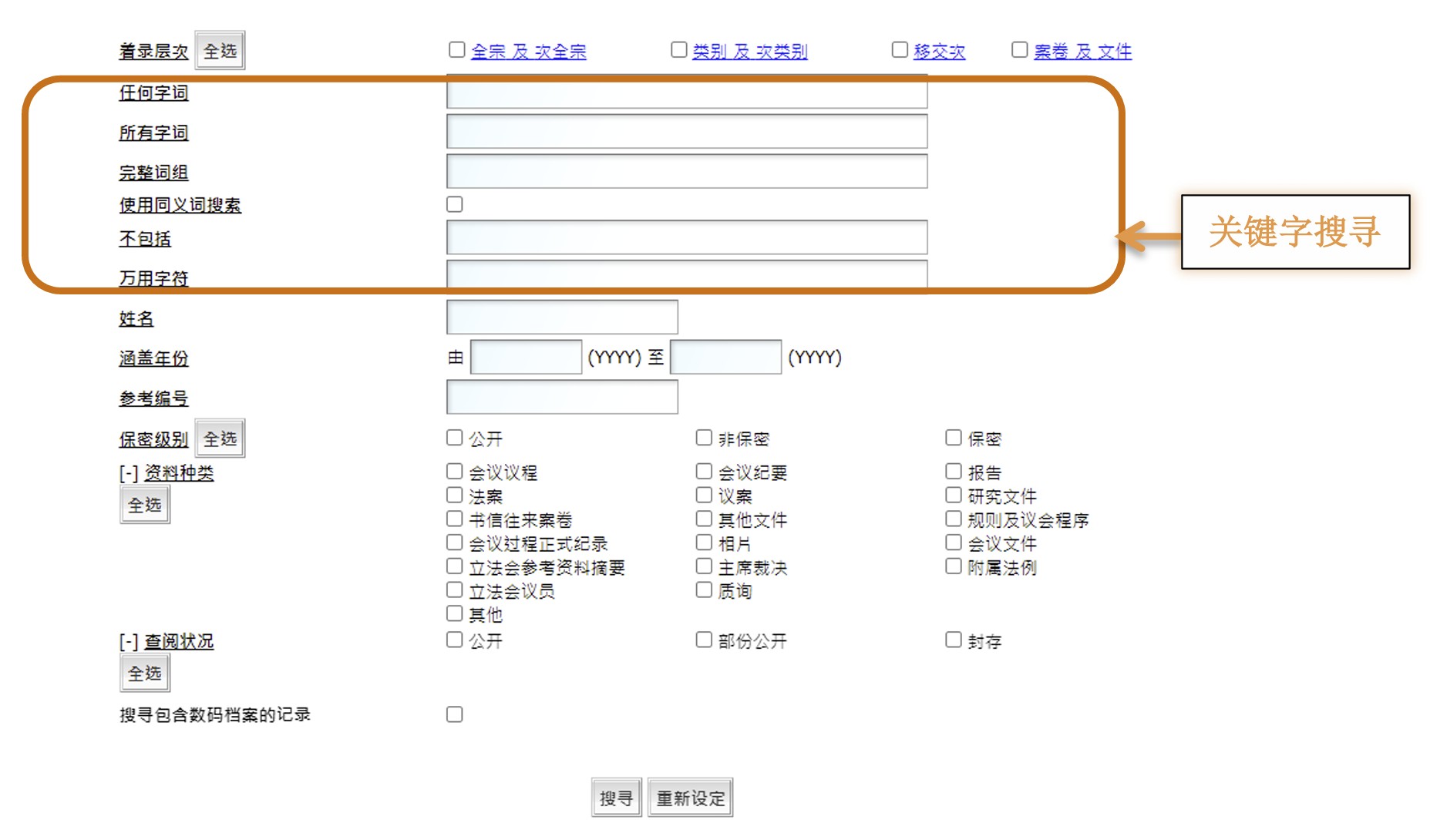
Users may broaden or narrow a record search by entering search terms in multiple search boxes and/or combine predefined search criteria.
When more than one search box is entered, the default is an AND search.
使用者可在不同的檢索欄輸入關鍵字或組合一些預設的搜尋條件,以擴闊或縮窄搜尋結果。
當使用者輸入多過一個檢索欄時,系統會設定為以 AND 作搜尋。
使用者可在不同的检索栏输入关键字或组合一些预设的搜寻条件,以扩阔或缩窄搜寻结果。
当使用者输入多过一个检索栏时,系统会设定为以 AND 作搜寻。
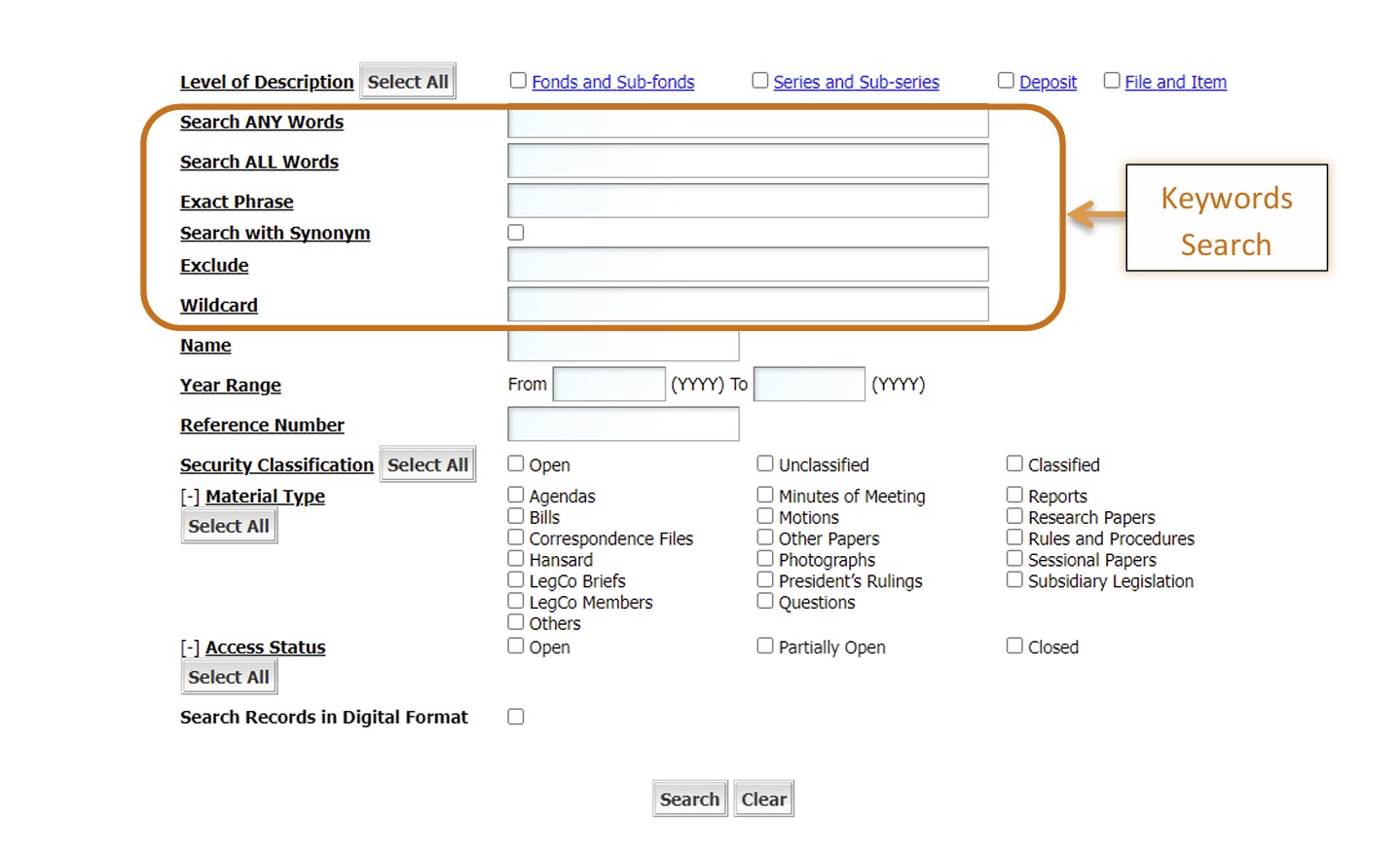
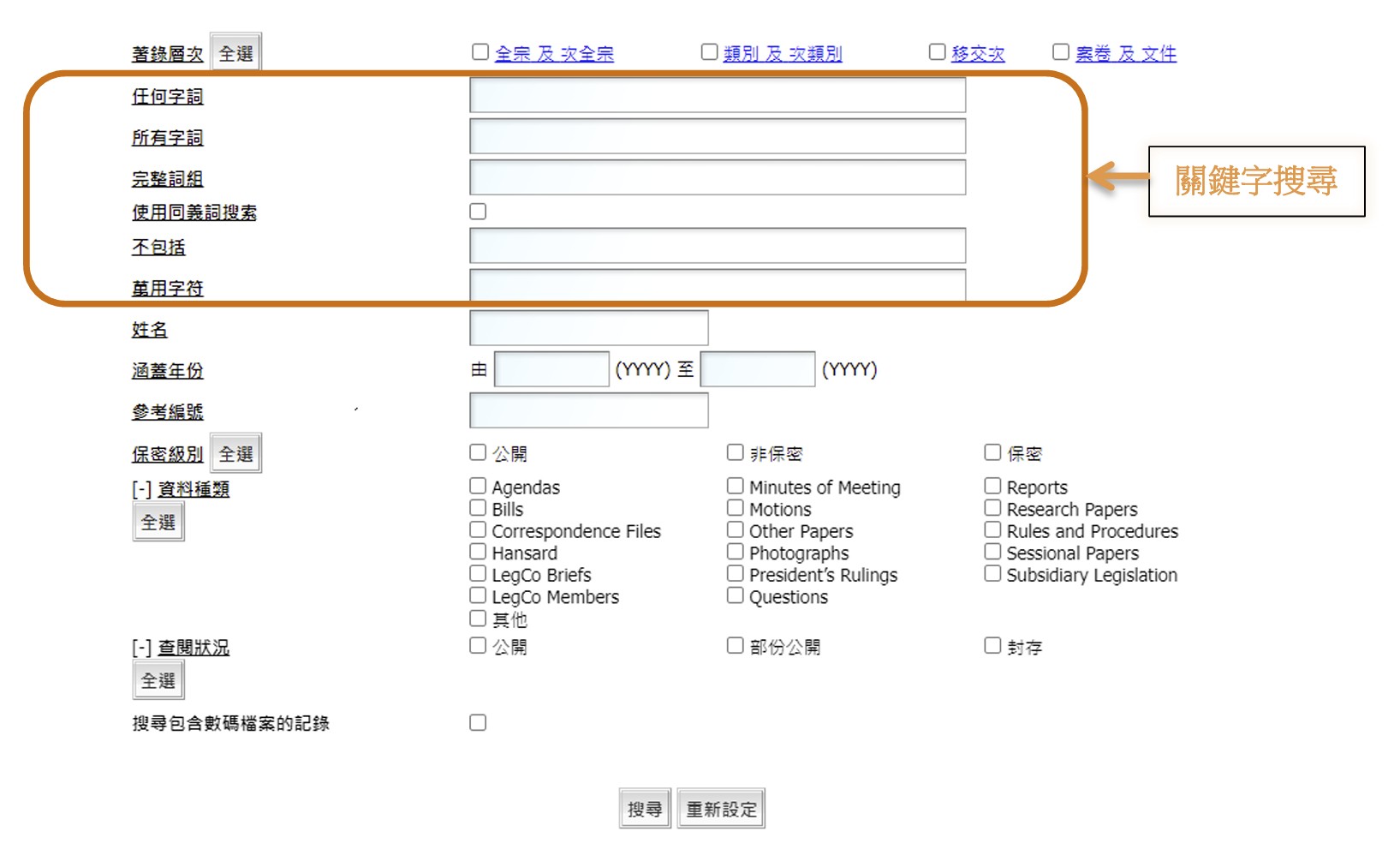
(1) Definition of Levels of Description (1) 著錄層次的定義 (1) 著录层次的定义
In the context of CAROL: 以下定義適用於CAROL: 以下定义适用于CAROL:
| Level 層次 层次 | Description 說明 说明 |
|---|---|
| FONDS 全宗 全宗 |
Fonds refers to the whole of the records, regardless of form or medium, organically created,
accumulated and/or used by a single entity, which is usually an organization or body, corporate or
non-corporate, or a distinctive group within the organization or body, in the course of its
functions and activities. Fonds is the highest level of archival description.
全宗指不管其形式或載體,由一個獨立單位(通常是一個機構或組織,企業或非企業,或組織內部的一個特別群組)在履行職務及進行活動時,有組織地產生、積累和/或使用的檔案的整體。全宗是所有著錄層次中的最高層次。
全宗指不管其形式或载体,由一个独立单位(通常是一个机构或组织,企业或非企业,或组织内部的一个特别群组)在履行职务及进行活动时,有组织地产生、积累和/或使用的档案的整体。全宗是所有著录层次中的最高层次。
|
| SUB-FONDS 次全宗 次全宗 |
Sub-fonds is a subdivision of a fonds containing related records corresponding to the
administrative or functional sub-division in the originating organization or body, or to the
geographical, chronological or other logical grouping such as major themes.
次全宗是全宗的一個分支。次全宗包含的是與產生檔案的機構或組織內的行政或職能單位,或根據地理、年期或其他邏輯作分類(譬如主題)的有關檔案。
次全宗是全宗的一个分支。次全宗包含的是与产生档案的机构或组织内的行政或职能单位,或根据地理、年期或其他逻辑作分类(譬如主题)的有关档案。
|
| SERIES 類別 类别 |
Series contains a group of records arranged according to a filing system or maintained as a unit
as the records relate to a specific function or subject, result from the same activity, share a
particular form or because of some other relationship arising from their creation, receipt or use,
e.g. Minutes of Council Meetings.
類別包含一組按照一個歸檔系統而編排的檔案,或檔案由於與某特定職能或主題相關、進行同一活動而產生、屬於同一特定形態,或者基於與產生、接收或使用時的其他關係而合成一組的檔案,譬如立法會會議紀要。
类别包含一组按照一个归档系统而编排的档案,或档案由于与某特定职能或主题相关、进行同一活动而产生、属于同一特定形态,或者基于与产生、接收或使用时的其他关系而合成一组的档案,譬如立法会会议纪要。
|
| SUB-SERIES 次類別 次类别 |
Sub-series is a subdivision of a series containing related records corresponding to the function,
subject or activities of the originating series, or to logical grouping of the records.
次類別是檔案類別的一個分支。次類別包含的是與產生檔案的機構或組織的職能、主題和活動,或按邏輯分類而成的有關檔案。
次类别是档案类别的一个分支。次类别包含的是与产生档案的机构或组织的职能、主题和活动,或按逻辑分类而成的有关档案。
|
| DEPOSIT 移交次 移交次 |
For management purpose, records within a SERIES are identified by a Deposit number, which is
allotted consecutively to document the sequential number of times the records identified under the
same series have been transferred to the LegCo Archives. In most cases, records within a SERIES
acquired from the same source by a particular transfer or have the same physical format and/or
access arrangement form a DEPOSIT.
為方便管理,屬於同一類別的檔案會以移交次辨識。每個移交次有一個順序編排的號碼,以識別同一類別的檔案移交到立法會檔案館的次數。大多數情況下,同一類別的檔案在同一時間由同一來源收集,或是檔案由於形態相同及/或有同一查閱安排,會編配成一個移交次。
为方便管理,属于同一类别的档案会以移交次辨识。每个移交次有一个顺序编排的号码,以识别同一类别的档案移交到立法会档案馆的次数。大多数情况下,同一类别的档案在同一时间由同一来源收集,或是档案由于形态相同及/或有同一查阅安排,会编配成一个移交次。
|
| FILE 案卷 案卷 |
File is a unit within a DEPOSIT. It is an organized unit of documents and material grouped
together because they relate to the same subject matter or transaction. Common physical forms of a
FILE include paper file, bound volume, register, photo album, disks or tapes.
案卷是組成移交次的單位。案卷是由與相同主題或活動有關的文件和資料組織而成的單位。案卷的形態包括紙張案卷、合訂本、登記冊、照片集、光/磁盤或錄像/音帶。
案卷是组成移交次的单位。案卷是由与相同主题或活动有关的文件和资料组织而成的单位。案卷的形态包括纸张案卷、合订本、登记册、照片集、光/磁盘或录像/音带。
|
| ITEM 文件 文件 |
Item is the basic unit within a File. It could be a document, a report, a photograph or any
physical object. It is sometimes listed and described to facilitate access and retrieval as an
individual unit. Item is the lowest level of archival description.
文件是組成案卷的基本單位。它可以是一份文件、一份報告、一幀照片或任何實物。文件有時會個別列出或著錄,以方便查閱及搜尋。文件是著錄層次中最低的層次。
文件是组成案卷的基本单位。它可以是一份文件、一份报告、一帧照片或任何实物。文件有时会个别列出或著录,以方便查阅及搜寻。文件是著录层次中最低的层次。
|
Users can select all levels or check a specific level of description by ticking the appropriate check box. 使用者可選擇所有層次或勾選層次旁的方格,以搜尋特定層次的檔案。 使用者可选择所有层次或勾选层次旁的方格,以搜寻特定层次的档案。
(2) Keywords Search (2) 關鍵字搜尋 (2) 关键字搜寻
Search Field Instructions 搜尋欄說明 搜寻栏说明
| Field Name 欄位名稱 栏位名称 | Instructions 搜尋說明 搜寻说明 |
|---|---|
| Search ANY words 任何字詞 任何字词 |
|
| Search ALL words 所有字詞 所有字词 |
|
| Exact Phrase 完整詞組 完整词组 |
|
| Exclude 不包括 不包括 |
|
| Wildcard 萬用字符 万用字符 |
|
(3) Search with Synonym (3) 使用同義詞搜索 (3) 使用同义词搜索
User can activate Search with Synonym by ticking the next to it and enter a word, more than one word or an abbreviation.
For example, enter Provisional Legislative Council in the Keywords search box, search results will find the matching synonyms. Records containing ‘Provisional Legislative Council’, ‘Provisional LegCo’ and ‘PLC’ will be displayed.
使用者可勾選使用同義詞搜索欄旁的方格 ,並輸入一個或以上的字或縮寫,來啟動該搜索功能。
例如輸入 Provisional Legislative Council,搜尋結果會尋找其同義詞而顯示包括 ‘Provisional Legislative Council’、 ‘PLC’ 及 ‘Provisional LegCo’ 的檔案。
使用者可勾选使用同义词搜索栏旁的方格 ,并输入一个或以上的字或缩写,来启动该搜索功能。
例如输入 Provisional Legislative Council,搜寻结果会寻找其同义词而显示包括 ‘Provisional Legislative Council’、 ‘PLC’ 及 ‘Provisional LegCo’ 的档案。
(4) Name Search (4) 姓名搜尋 (4) 姓名搜寻
Enter name, e.g. margaret in the Name search box will lead to a search of records with the exact word ‘margaret’.
Enter margaret ng will lead to a search of ‘margaret’, ‘ng’ or ‘margaret ng’.
Users who wish to search the exact name ‘margaret ng’ should enter margaret ng in the Keywords search box and select “Exact Phrase”.
在姓名搜尋欄輸入 margaret,系統會搜尋包含 ‘margaret’ 一字的檔案;輸入 margaret ng 詞組,系統會搜尋包含 ‘margaret’ 或 ‘ng’ 或 ‘margaret ng’ 的檔案。
使用者如欲搜尋完整詞組 ‘margaret ng’,可於關鍵字搜尋欄選擇 "完整詞組",然後輸入 margaret ng。
在姓名搜寻栏输入 margaret,系统会搜寻包含 ‘margaret’ 一字的档案;输入 margaret ng 词组,系统会搜寻包含 ‘margaret’ 或 ‘ng’ 或 ‘margaret ng’ 的档案。
使用者如欲搜寻完整词组 ‘margaret ng’,可于关键字搜寻栏选择 "完整词组",然后输入 margaret ng。
(5) Year Range (5) 涵蓋年份 (5) 涵盖年份
- (a) Enter the years, e.g. 1990(YYYY) and 2001(YYYY) in the From and To search boxes respectively will lead to a search of records created between the year range specified. (a) 輸入年份,例如 由 1990(YYYY)至 2001(YYYY),系統會搜尋產生於所輸入的涵蓋年份間的檔案。 (a) 输入年份,例如 由 1990(YYYY)至 2001(YYYY),系统会搜寻产生于所输入的涵盖年份间的档案。
- (b) Users can enter the year only in the (b) 使用者可只在 (b) 使用者可只在 search box which will lead to a search of records created in or after that year. 一欄輸入年份,系統會搜尋產生於該年份或之後的檔案。 一栏输入年份,系统会搜寻产生于该年份或之后的档案。
- (c) Enter the year only in the (c) 使用者可只在 (c) 使用者可只在 search box will lead to a search of records created in or before that year. 一欄輸入年份,系統會搜尋產生於該年份或之前的檔案。 一栏输入年份,系统会搜寻产生于该年份或之前的档案。
(6) Reference Number
Users can enter a reference number whether it is alphabetic (not case sensitive), numeric or alphanumeric to conduct a record search. The reference number maybe:
- (a) The code assigned to a record prior to its transfer to the LegCo Archives, e.g.: reference number for a specific file is MB/CS/9.
- (b) The code assigned by the LegCo Archives to a record at any level either in the LegCo Archives Series (LAS) or the LegCo Manuscript Series (LMS), e.g.:
LegCo Archives Series (LAS)
| Reference No. | Level |
|---|---|
| AF1 | (FONDS level) |
| ASF1 | (SUB-FONDS level) |
| LAS1 | (SERIES level) |
| LASS1 | (SUB-SERIES level) |
| LAS1/1 | (DEPOSIT level directly under SERIES level) |
| LASS1/1 | (DEPOSIT level directly under SUB-SERIES level) |
| LAS1/1/1 | (FILE level directly under SERIES-DEPOSIT levels) |
| LASS1/1/1 | (FILE level directly under SUB-SERIES-DEPOSIT levels) |
| LAS1/1/1/1 | (ITEM level directly under SERIES-DEPOSIT-FILE levels) |
| LASS1/1/1/1 | (ITEM level directly under SUB-SERIES-DEPOSIT-FILE levels) |
LegCo Manuscript Series (LMS)
| Reference No. | Level |
|---|---|
| MC1 | (FONDS level) |
| MSC1 | (SUB-FONDS level) |
| LMS1 | (SERIES level) |
| LMSS1 | (SUB-SERIES level) |
| LMS1/1 | (DEPOSIT level directly under SERIES level) |
| LMSS1/1 | (DEPOSIT level directly under SUB-SERIES level) |
| LMS1/1/1 | (FILE level directly under SERIES-DEPOSIT levels) |
| LMSS1/1/1 | (FILE level directly under SUB-SERIES-DEPOSIT levels) |
| LMS1/1/1/1 | (ITEM level directly under SERIES-DEPOSIT-FILE levels) |
| LMSS1/1/1/1 | (ITEM level directly under SUB-SERIES-DEPOSIT-FILE levels) |
(6) 參考編號
使用者可輸入檔案的參考編號來搜尋檔案,不管該編號是英文字母(不分大小寫)、數字或字母數字。檔案的參考編號可以是:
- (a) 檔案於移交立法會檔案館前的原有代號,例如:MB/CS/9。
- (b) 由立法會檔案館根據檔案所屬的著錄層次而編配的檔案代號;該代號分為立法會歷史檔案類別(LAS)或立法會私人手稿類別(LMS)兩類,例如:
立法會歷史檔案類別(LAS)
| 參考編號 | 層次 |
|---|---|
| AF1 | (全宗層次) |
| ASF1 | (次全宗層次) |
| LAS1 | (類別層次) |
| LASS1 | (次類別層次) |
| LAS1/1 | (移交次層次直屬類別層次) |
| LASS1/1 | (移交次層次直屬次類別層次) |
| LAS1/1/1 | (案卷層次直屬類別–移交次層次) |
| LASS1/1/1 | (案卷層次直屬次類別–移交次層次) |
| LAS1/1/1/1 | (文件層次直屬類別–移交次–案卷層次) |
| LASS1/1/1/1 | (文件層次直屬次類別–移交次–案卷層次) |
立法會私人手稿類別(LMS)
| 參考編號 | 層次 |
|---|---|
| MC1 | (全宗層次) |
| MSC1 | (次全宗層次) |
| LMS1 | (類別層次) |
| LMSS1 | (次類別層次) |
| LMS1/1 | (移交次層次直屬類別層次) |
| LMSS1/1 | (移交次層次直屬次類別層次) |
| LMS1/1/1 | (案卷層次直屬類別–移交次層次) |
| LMSS1/1/1 | (案卷層次直屬次類別–移交次層次) |
| LMS1/1/1/1 | (文件層次直屬類別–移交次–案卷層次) |
| LMSS1/1/1/1 | (文件層次直屬次類別–移交次–案卷層次) |
(6) 参考编号
使用者可输入档案的参考编号来搜寻档案,不管该编号是英文字母(不分大小写)、数字或字母数字。档案的参考编号可以是:
- (a) 档案于移交立法会档案馆前的原有代号,例如:MB/CS/9。
- (b) 由立法会档案馆根据档案所属的著录层次而编配的档案代号;该代号分为立法会历史档案类别(LAS)或立法会私人手稿类别(LMS)两类,例如:
立法会历史档案类别(LAS)
| 参考编号 | 层次 |
|---|---|
| AF1 | (全宗层次) |
| ASF1 | (次全宗层次) |
| LAS1 | (类别层次) |
| LASS1 | (次类别层次) |
| LAS1/1 | (移交次层次直属类别层次) |
| LASS1/1 | (移交次层次直属次类别层次) |
| LAS1/1/1 | (案卷层次直属类别–移交次层次) |
| LASS1/1/1 | (案卷层次直属次类别–移交次层次) |
| LAS1/1/1/1 | (文件层次直属类别–移交次–案卷层次) |
| LASS1/1/1/1 | (文件层次直属次类别–移交次–案卷层次) |
立法会私人手稿类别(LMS)
| 参考编号 | 层次 |
|---|---|
| MC1 | (全宗层次) |
| MSC1 | (次全宗层次) |
| LMS1 | (类别层次) |
| LMSS1 | (次类别层次) |
| LMS1/1 | (移交次层次直属类别层次) |
| LMSS1/1 | (移交次层次直属次类别层次) |
| LMS1/1/1 | (案卷层次直属类别–移交次层次) |
| LMSS1/1/1 | (案卷层次直属次类别–移交次层次) |
| LMS1/1/1/1 | (文件层次直属类别–移交次–案卷层次) |
| LMSS1/1/1/1 | (文件层次直属次类别–移交次–案卷层次) |
(7) Material Type (7) 資料種類 (7) 资料种类
Users can search a specific type(s) of archival records and material by selecting one or more material types in the appropriate check box. At the moment, the following material types are available for selection:
| - | Material Type |
|---|---|
| (a) | Agendas |
| (b) | Bills |
| (c) | Correspondence Files |
| (d) | Hansard |
| (e) | LegCo Briefs |
| (f) | LegCo Members |
| (g) | Minutes of Meeting |
| (h) | Motions |
| (i) | Photographs |
| (j) | President's Rulings |
| (k) | Questions |
| (l) | Reports |
| (m) | Research Papers |
| (n) | Rules and Procedures |
| (o) | Sessional Papers |
| (p) | Subsidiary Legislation |
| (q) | Video Recordings |
| (r) | Others |
使用者可從資料種類旁的方格勾選一個或多個資料種類來搜尋特定的歷史檔案和資料。現時,下列的資料種類可供選擇:
| - | 資料種類 |
|---|---|
| (a) | 會議議程 |
| (b) | 法案 |
| (c) | 書信往來案卷 |
| (d) | 會議過程正式紀錄 |
| (e) | 立法會參考資料摘要 |
| (f) | 立法會議員 |
| (g) | 會議紀要 |
| (h) | 議案 |
| (i) | 相片 |
| (j) | 主席裁決 |
| (k) | 規則及議會程序 |
| (l) | 質詢 |
| (m) | 報告 |
| (n) | 研究文件 |
| (o) | 會議文件 |
| (p) | 附屬法例 |
| (q) | 其他 |
使用者可从资料种类旁的方格勾选一个或多个资料种类来搜寻特定的历史档案和资料。现时,下列的资料种类可供选择:
| - | 资料种类 |
|---|---|
| (a) | 会议议程 |
| (b) | 法案 |
| (c) | 书信往来案卷 |
| (d) | 会议过程正式纪录 |
| (e) | 立法会参考资料摘要 |
| (f) | 立法会议员 |
| (g) | 会议纪要 |
| (h) | 议案 |
| (i) | 相片 |
| (j) | 主席裁决 |
| (k) | 规则及议会程序 |
| (l) | 质询 |
| (m) | 报告 |
| (n) | 研究文件 |
| (o) | 会议文件 |
| (p) | 附属法例 |
| (q) | 其他 |
(8) Access Status (8) 查閱狀況 (8) 查阅状况
Archival records of three types of access status are available for search and the default is to search all types:
使用者可搜尋屬於以下三種查閱狀況的歷史檔案,若使用者沒作挑選,系統會自動搜尋所有查閱狀況的檔案:
使用者可搜寻属于以下三种查阅状况的历史档案,若使用者没作挑选,系统会自动搜寻所有查阅状况的档案:
Access Status Description 查閱狀況 註釋 查阅状况 注释
| Status 狀況 状况 | Explanation 註釋 注释 |
|---|---|
| Open 公開 公开 |
users can reserve or order open archival records for viewing at the LegCo Archives without application.
使用者不需事先申請便可預約或在立法會檔案館翻閱的檔案。
使用者不需事先申请便可预约或在立法会档案馆翻阅的档案。
|
| Partially Open 部份公開 部份公开 |
this indicates that some parts of the records are open to the public without application but some parts are closed.
表示有部分的檔案不需事先申請便可翻閱,但其他部分仍在封存。
表示有部分的档案不需事先申请便可翻阅,但其他部分仍在封存。
|
| Closed 封存 封存 |
closed records are records not available for public viewing. Classified records are subject to a maximum records closure period of 50 years and unclassified records 20 years, after which they will be reviewed to ascertain if public disclosure is prohibited by law. If access is not prohibited, they will become open records.
保密檔案指檔案仍未可提供予公眾查閱。保密檔案的最長封存期為 50 年,而非保密檔案則為 20 年。當封存期屆滿後及經過覆檢,除非法例禁止披露,否則檔案會解封及公開,而有關檔案亦會變成為公開檔案。
保密档案指档案仍未可提供予公众查阅。保密档案的最长封存期为 50 年,而非保密档案则为 20 年。当封存期届满后及经过覆检,除非法例禁止披露,否则档案会解封及公开,而有关档案亦会变成为公开档案。
|
Users can raise an access request for any closed classified or unclassified records before they reach their maximum closure period at anytime by filling in an application form and send it to the Access to Information Officer.
An access review will be performed to examine if the requested records could be made available according to the access policy of the Legislative Council and The Legislative Council Commission.
Classified records are reviewed within 25 years of their existence for declassification and those remain classified will be reviewed again every 4 years.
More information on access is available from Open LegCo on the Website of the Legislative Council.
在最長檔案封存期屆滿前,使用者可以填寫查閱封存文件及紀錄的申請表格,以及將填妥的表格提交公開資料主任,要求查閱封存的保密或非保密檔案。立法會和立法會行政管理委員會會根據有關的查閱政策覆檢檔案,決定是否披露有關檔案。
保密檔案於存在 25 年內會作解密覆檢,如檔案在覆檢後仍需保密,則須在覆檢後每 4 年再覆檢一次。
有關查閱政策的詳細資料,可瀏覽立法會網頁公開的議會。
在最长档案封存期届满前,使用者可以填写查阅封存文件及纪录的申请表格,以及将填妥的表格提交公开资料主任,要求查阅封存的保密或非保密档案。立法会和立法会行政管理委员会会根据有关的查阅政策覆检档案,决定是否披露有关档案。
保密档案于存在 25 年内会作解密覆检,如档案在覆检后仍需保密,则须在覆检后每 4 年再覆检一次。
有关查阅政策的详细资料,可浏览立法会网页公开的议会。
(9) Circulation Status (9) 流通狀況 (9) 流通状况
Records indicated as "On Shelf" in the Search Results simply means the records are not being used by other parties. It does not imply that the records are open for public access. Only records at File or Item level that are "On Shelf" (Circulation Status) and "Open" (Access Status) can be reserved or ordered for viewing by CAROL. As for closed records, users can request access by application.
Please see below for the details on Circulation Status:
檔案的流通狀況為 "在架上" 是指沒有使用者正使用該檔案,並非表示該檔案可以公開予公眾查閱。只有流通狀況為 "在架上" 及查閱狀況為 "公開" 的案卷或文件,方可以透過CAROL預約或查閱。使用者可申請要求查閱封存的檔案。
有關流通狀況的詳情,請參閱以下資料:
档案的流通状况为 "在架上" 是指没有使用者正使用该档案,并非表示该档案可以公开予公众查阅。只有流通状况为 "在架上" 及查阅状况为 "公开" 的案卷或文件,方可以透过CAROL预约或查阅。使用者可申请要求查阅封存的档案。
有关流通状况的详情,请参阅以下资料:
Circulation Status Description 流通狀況 註釋 流通状况 注释
| Circulation Status 流通狀況 流通状况 | Explanation 註釋 注释 |
|---|---|
| On Shelf 在架上 在架上 |
File or Item is not being used.
沒有人正使用該案卷或文件。
没有人正使用该案卷或文件。
|
| Requested 已要求 已要求 |
File or Item is unavailable as it is being ordered for viewing.
有其他人正要求借閱該案卷或文件,所以不可借閱。
有其他人正要求借阅该案卷或文件,所以不可借阅。
|
| Ordered 已借閱 已借阅 |
File or Item is unavailable as it has been issued for viewing.
有其他人正查閱該案卷或文件,所以不可預約或借閱。
有其他人正查阅该案卷或文件,所以不可预约或借阅。
|
| Requisitioned 內部使用 内部使用 |
File or Item is being used by the LegCo Secretariat and unavailable for reservation or viewing.
立法會秘書處正使用該案卷或文件,所以不可預約或借閱。
立法会秘书处正使用该案卷或文件,所以不可预约或借阅。
|
| Under Conservation Treatment 修復中 修复中 |
File or Item is unavailable because of records conservation.
基於修復的原因,案卷或文件不可預約或借閱。
基于修复的原因,案卷或文件不可预约或借阅。
|
| Unavailable 未能使用 未能使用 |
File or Item cannot be reserved or ordered for viewing.
案卷或文件不可預約或借閱。
案卷或文件不可预约或借阅。
|
10. Search Records in Digital Format 10. 搜尋數碼格式檔案 10. 搜寻数码格式档案
User can activate Search Records in Digital Format by ticking the check box next to it.
使用者可勾選搜尋包含數碼格式的檔案欄旁的方格,以啟動此功能。
使用者可勾选搜寻包含数码格式的档案栏旁的方格,以启动此功能。
Records that have a duplicate copy in digital format will be displayed as indicated by an icon
包含數碼複本的檔案會在搜尋結果中以圖標
包含数码复本的档案会在搜寻结果中以图标
 in the Search Results.
顯示。
显示。
in the Search Results.
顯示。
显示。
The duplicate copy can be reserved or ordered for viewing at the Archives by CAROL. Some selected records can be accessed online through CAROL.
使用者可透過CAROL預約或借閱該等數碼複本於檔案館閱覽。部分檔案可透過CAROL線上查閱。
使用者可透过CAROL预约或借阅该等数码复本于档案馆阅览。部分档案可透过CAROL线上查阅。
d. Search Results d. 搜尋結果 d. 搜寻结果
-
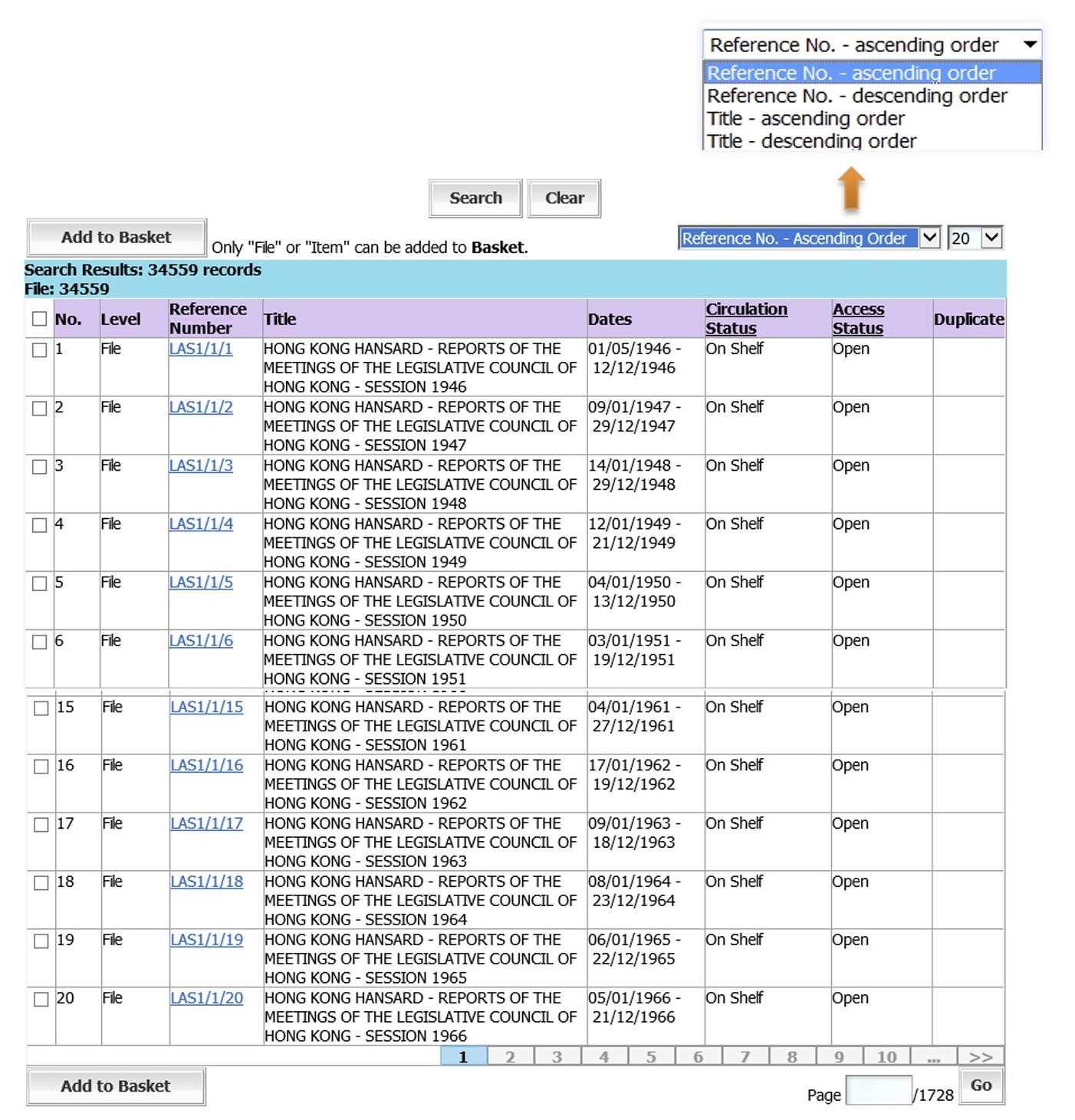
Search Results provide information on the archival records that match the input search criteria. Each search result shows the level of description, reference number, title, date (e.g. inclusive years), circulation status, access status and duplicate (if applicable) of the records found. If no record is found, the system will show: Search Results: 0 record(s).
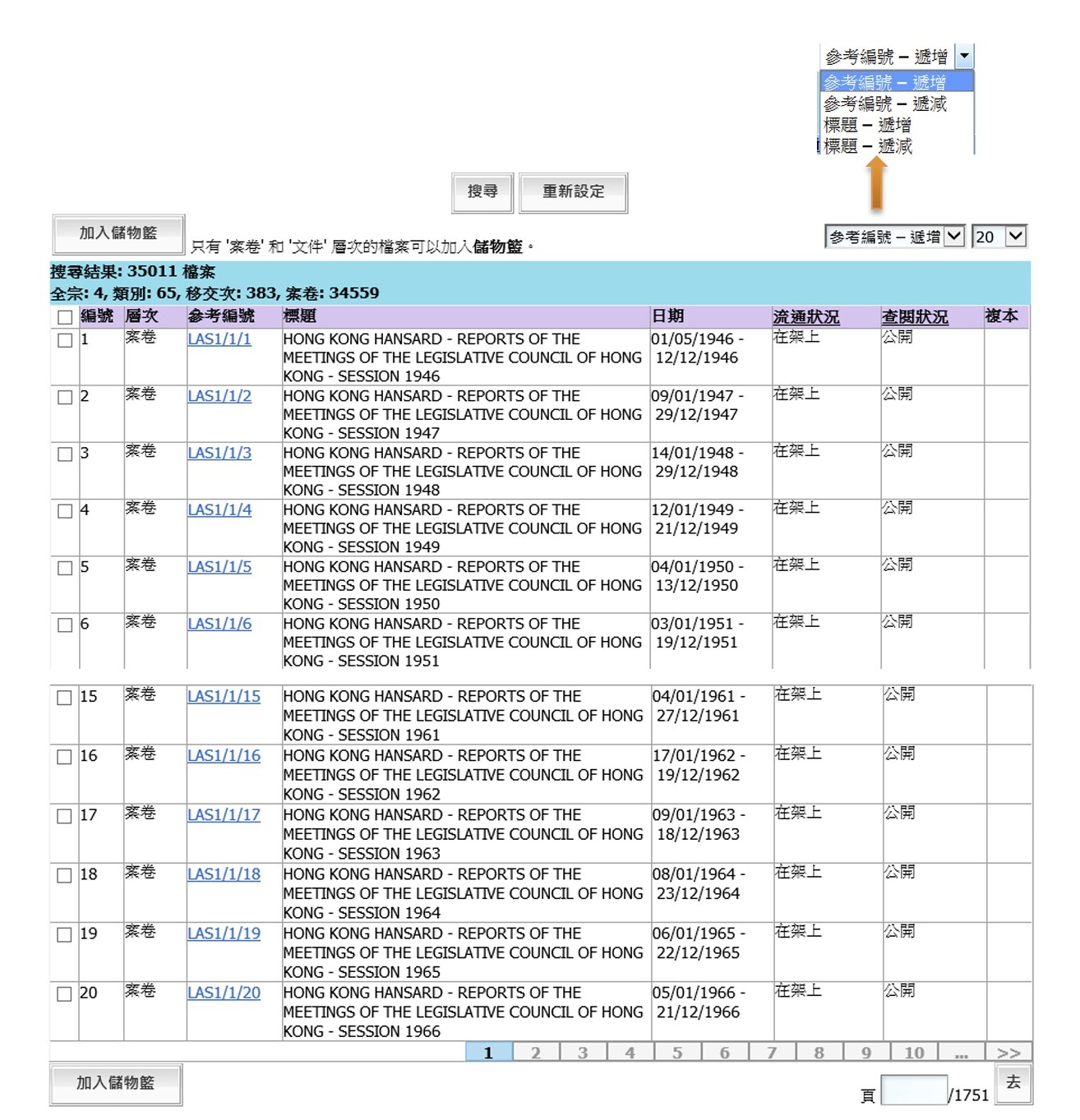
如果有檔案符合所輸入的搜尋條件,相關檔案的資料便會在搜尋結果顯示。搜尋結果會顯示有關檔案的著錄層次、參考編號、標題、日期(涵蓋日期)、流通狀況、查閱狀況及複本(如適用)。如沒有檔案符合搜尋條件,系統會顯示:搜尋結果: 0 檔案。
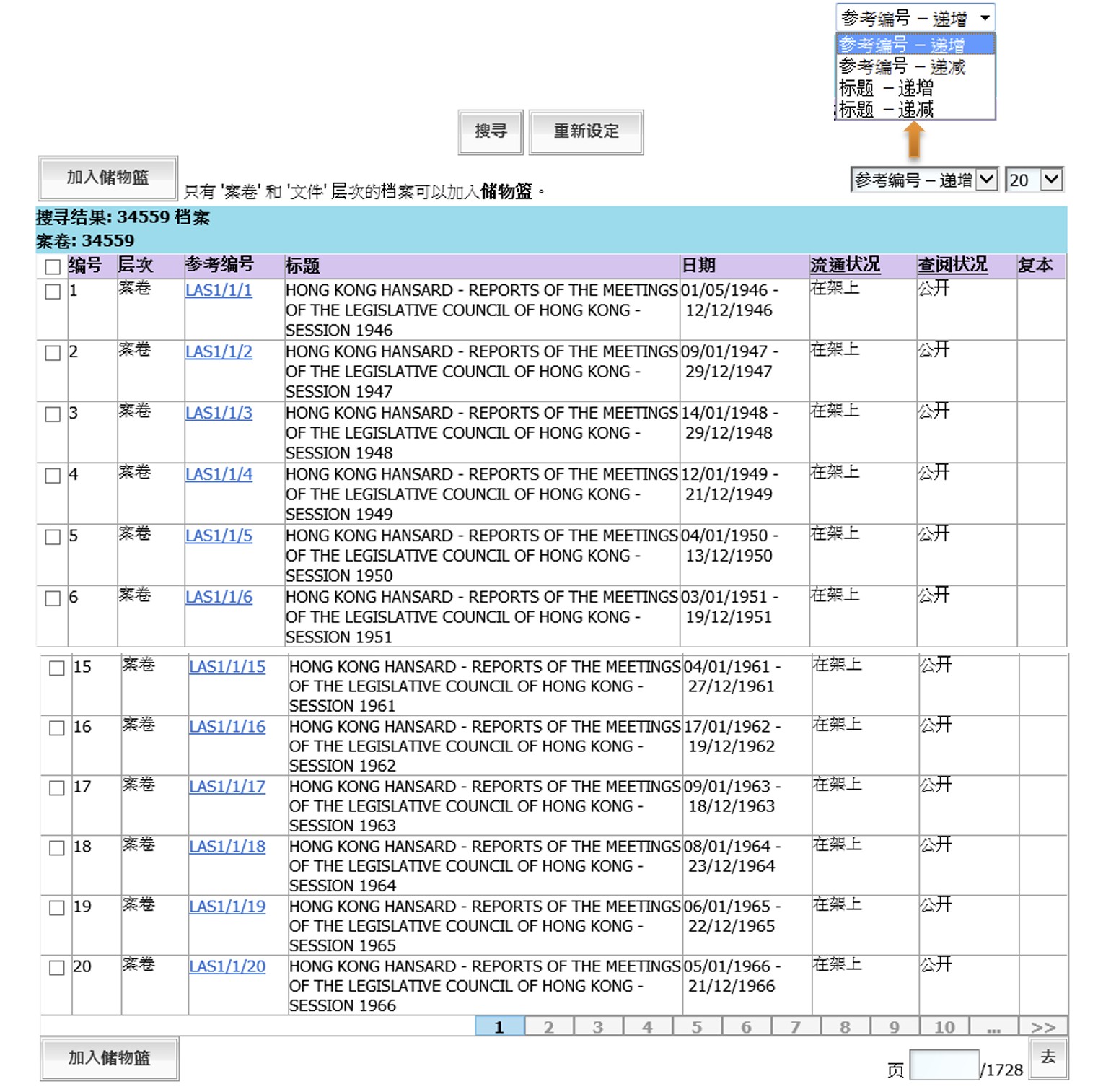
如果有档案符合所输入的搜寻条件,相关档案的资料便会在搜寻结果显示。搜寻结果会显示有关档案的著录层次、参考编号、标题、日期(涵盖日期)、流通状况、查阅状况及复本(如适用)。如没有档案符合搜寻条件,系统会显示:搜寻结果: 0 档案。
-
Users can click the reference number of each record to view the detailed information about the record.
使用者可以按參考編號的連結查看有關檔案的詳細資料。
使用者可以按参考编号的连结查看有关档案的详细资料。
-
Users can sort the Search Results by reference number or title in ascending or descending order and select the number of Search Results to be displayed on each page from the pull down boxes at the top right corner of the Search Results list.
使用者可以在搜尋結果右上角的下拉盒,選擇以參考編號或標題遞增或遞減序列來顯示搜尋結果和每頁可顯示的檔案數目。
使用者可以在搜寻结果右上角的下拉盒,选择以参考编号或标题递增或递减序列来显示搜寻结果和每页可显示的档案数目。
-
To navigate the list of Search Results, use the navigation button at the bottom of the list.
可使用搜尋結果列表下方的頁碼按鈕,瀏覽搜尋結果。
可使用搜寻结果列表下方的页码按钮,浏览搜寻结果。
-
To move sequentially back to the previous or to the next 10 pages of the Search Results, click the
 buttons. Clicking the
 and
and  buttons will display the first and last page of Search Results respectively. To navigate directly to a specific page in the Search Results, enter the page number in the text box and click
 .
.
瀏覽搜尋結果的不同頁面,使用者可按
瀏覽之前或之後的10頁搜尋結果;按 ; 及 ; 瀏覽列表的首頁及最後一頁。如果要瀏覽特定頁數,使用者可於頁碼欄輸入頁碼,然後按  。
。浏览搜寻结果的不同页面,使用者可按
浏览之前或之后的10页搜寻结果;按 ; 及 ; 浏览列表的首页及最后一页。如果要浏览特定页数,使用者可于页码栏输入页码,然后按 。
III. View Archival Records III. 查閱歷史檔案 III. 查阅历史档案
Archival records are available for viewing only at the LegCo Archives.
Users can reserve archival records for viewing on a selected date using the computer workstations at the LegCo Archives or via Internet access.
歷史檔案只供使用者在立法會檔案館閱覽。
使用者可在立法會檔案館的電腦或透過互聯網預約歷史檔案,及選擇閱覽日期。
历史档案只供使用者在立法会档案馆阅览。
使用者可在立法会档案馆的电脑或透过互联网预约历史档案,及选择阅览日期。
a. Your Basket a. 你的儲物籃 a. 你的储物篮
-
Users can select only records at "File" or "Item" level by ticking the check box next to the required entries with or without login. Click
 to save the selected records for further action such as reservation or order for viewing. Users must
Login to reserve or order selected records that are
"On Shelf" (Circulation Status) and "Open"
(Access Status).
to save the selected records for further action such as reservation or order for viewing. Users must
Login to reserve or order selected records that are
"On Shelf" (Circulation Status) and "Open"
(Access Status).無論使用者已登入或未登入系統,只可選擇屬 "案卷" 或 "文件" 層次的檔案。請先勾選所需檔案旁的方格,然後按
 預約或借閱檔案。使用者必須登入系統,方可預約或借閱 "在架上" (流通狀況) 及 "公開" (查閱狀況) 的檔案。
无论使用者已登入或未登入系统,只可选择属 "案卷" 或 "文件" 层次的档案。请先勾选所需档案旁的方格,然后按
 预约或借阅档案。使用者必须登入系统,方可预约或借阅 "在架上" (流通状况) 及 "公开" (查阅状况) 的档案。
 -
Users have to save the selected records page by page if the Search Results list is more than one page.
如搜尋結果超過一頁,使用者須要逐頁將選擇的檔案儲存在儲物籃。
如搜寻结果超过一页,使用者须要逐页将选择的档案储存在储物篮。
-
Up to 100 records can be added to Basket at one time.
儲物籃每次可儲存最多100個檔案的資料。
储物篮每次可储存最多100个档案的资料。
-
All saved records in Your Basket will be kept until users logout from CAROL or close the window.
所有存放在儲物籃的檔案資料會保存至使用者登出系統或關閉視窗。
所有存放在储物篮的档案资料会保存至使用者登出系统或关闭视窗。
b. Reserve Archival Records b. 預約歷史檔案 b. 预约历史档案
-
Users can reserve records for viewing on a specific date at the LegCo Archives computer workstations or via Internet access. Simply log in CAROL, add the selected records to Basket and then click .
使用者可透過立法會檔案館內的電腦或互聯網預約特定日期查閱檔案。登入 CAROL,將已選擇的檔案加入儲物籃,然後按 。
使用者可透过立法会档案馆内的电脑或互联网预约特定日期查阅档案。登入 CAROL,将已选择的档案加入储物篮,然后按 。
-
Users can reserve up to 12 archival records per day.
使用者每天可預約最多12個歷史檔案。
使用者每天可预约最多12个历史档案。
-
Only records at "File" or "Item" level that are "On Shelf" (Circulation Status) and "Open" (Access Status) can be reserved.
-
Users can tick the check box next to the required entries. Choose a viewing date after selecting by clicking the empty box next to Viewing Date.
使用者可勾選所需檔案旁邊的方格,按
使用者可勾选所需档案旁边的方格,按
-
Choose a suitable date from the pop-up calendar (the Archives is closed on Saturdays, Sundays and public holidays). The viewing date should be the day or within 30 days from the day the records are reserved.
在 彈出日曆 上選擇適當的日期(檔案館於星期六、日及公眾假期休館)。閱覽日期必須為預約檔案當日或其後三十日內。
在 弹出日历 上选择适当的日期(档案馆于星期六、日及公众假期休馆)。阅览日期必须为预约档案当日或其后三十日内。
-
Users click
 to complete the reservation procedure.
選擇閱覽日期後,按
 完成預約程序。
选择阅览日期后,按
 完成预约程序。
 -
An icon
 will appear next to "On Shelf"
(Circulation Status) which indicates the records reserved. To change the
viewing date or delete all or some of the reserved items, users may click the icon which will link to Manage Reserved Records.
will appear next to "On Shelf"
(Circulation Status) which indicates the records reserved. To change the
viewing date or delete all or some of the reserved items, users may click the icon which will link to Manage Reserved Records.如果圖標
顯示於 "在架上" (流通狀況) 旁邊,即表示已預約該檔案。使用者可按圖標或管理已預約檔案更改閱覽日期或删除已預約的檔案。如果图标
显示于 "在架上" (流通状况) 旁边,即表示已预约该档案。使用者可按图标或管理已预约档案更改阅览日期或删除已预约的档案。
c. Manage Reserved Records c. 管理已預約檔案 c. 管理已预约档案
-
Users can change the viewing date by login CAROL and click the Manage Reserved Records from the menu bar.
使用者登入CAROL,然後在功能表列按 管理已預約檔案 來更改閱覽已預約檔案的日期。
使用者登入CAROL,然后在功能表列按 管理已预约档案 来更改阅览已预约档案的日期。
-
The system will display the selected viewing date(s).
系統將會顯示已選擇的閱覽日期。
系统将会显示已选择的阅览日期。
-
Click the link of the original viewing date and change it by selecting a new viewing date from the pop-up calendar. Click
 to complete the procedure.
按原本閱覽日期的連結,在 彈出日曆 上選擇新的閱覽日期,然後按
 完成更改程序。
按原本阅览日期的连结,在 弹出日历 上选择新的阅览日期,然后按
 完成更改程序。
 -
Users may also cancel any of the reserved records by selecting the record(s) and click
 .
.使用者也可刪除已預約的檔案。按原本擬閱覽日期的連結,選擇檔案,然後按
 。
。使用者也可删除已预约的档案。按原本拟阅览日期的连结,选择档案,然后按
。
d. Order Archival Records d. 借閱歷史檔案 d. 借阅历史档案
-
After login, users can search and order archival records at the LegCo Archives without reservation.
使用者可不需預約,在立法會檔案館登入CAROL後搜尋及借閱檔案。
使用者可不需预约,在立法会档案馆登入CAROL后搜寻及借阅档案。
-
Users select the required records from the Search Results by ticking the check box next to the records and click
.使用者在搜尋結果勾選所需檔案旁邊的方格,然後按
。使用者在搜寻结果勾选所需档案旁边的方格,然后按
。 -
From the Basket, users can select up to 6 records for viewing at one time by ticking the check box next to them and click .
在儲物籃中,使用者可勾選所需檔案旁邊的方格(每次最多選擇 6 個檔案),然後按
在储物篮中,使用者可勾选所需档案旁边的方格(每次最多选择 6 个档案),然后按
-
Only records at "File" or "Item" level that are "On Shelf" (Circulation Status) and "Open" (Access Status) can be ordered for viewing.
-
If users have reserved records, simply log in CAROL and click Order Reserved Records from the menu bar to confirm the order.
如使用者已預約檔案,可登入CAROL,在功能表列按 借閱已預約檔案 確定借閱。
如使用者已预约档案,可登入CAROL,在功能表列按 借阅已预约档案 确定借阅。
-
Users must agree to comply with the Legislative Council's policies and rules and the laws of Hong Kong in accessing, copying and using records and material issued by the LegCo Archives by ticking the " " check box and click
to complete the Order procedure.使用者必須勾選
使用者必须勾选
IV. Reader's Account IV. 登入帳號 IV. 登入账号
Users must register for a Reader's Account to reserve and/or order archival records for viewing.
使用者須於立法會檔案館登記一個登入帳號,方可預約及/或查閱歷史檔案。
使用者须于立法会档案馆登记一個登入账号,方可预约及/或查阅历史档案。
a. Registration for Reader's Account a. 登記登入帳號 a. 登记登入账号
-
Registration should be done at the LegCo Archives and applicants must show valid identification (ID card or travelling document).
公眾人士須親臨立法會檔案館辦理登記手續。申請者須出示有效身份證明文件(身份證或旅遊證件)。
公众人士须亲临立法会档案馆办理登记手续。申请者须出示有效身份证明文件(身份证或旅游证件)。
-
Public Users register online at the LegCo Archives by completing the Registration Form.
公眾人士可在立法會檔案館填寫線上登記表。
公众人士可在立法会档案馆填写线上登记表。
-
Click Register from the menu bar of CAROL to register for a Login ID.
首先在CAROL 的功能表列按 登記,以申請登入帳號。
首先在CAROL 的功能表列按 登记,以申请登入账号。
-
Fill in the required fields on the online registration form and click
 .
.在線上登記表內填上所需資料後,按
 。
。在线上登记表内填上所需资料后,按
。 -
Archives staff will verify the applicant's personal identity information.
檔案館職員會核對申請者的身份證明資料。
档案馆职员会核对申请者的身份证明资料。
-
The Reader's Account will be activated immediately.
完成上述程序後,登入帳號會即時生效。
完成上述程序后,登入账号会即时生效。
b. Why log in? b. 為何需要登入系統? b. 为何需要登入系统?
Users must log in to reserve and/or order archival records for viewing as well as to access View User Profile, Order Archival Records and Manage Reserved Records.
Other actions, such as searching, browsing CAROL or viewing digital records online, do not require login.
使用者須登入 CAROL,方可預約及/或查閱歷史檔案,以及閱覽使用者個人紀錄、借閱歷史檔案及管理已預約檔案。如使用其他功能,譬如搜尋檔案資料、瀏覽 CAROL 或線上查閱數碼檔案,則不需要登入系統。
使用者须登入 CAROL,方可预约及/或查阅历史档案,以及阅览使用者个人纪录、借阅历史档案及管理已预约档案。如使用其他功能,譬如搜寻档案资料、浏览 CAROL 或线上查阅数码档案,则不需要登入系统。
c. Forgot Login ID c. 忘記登入帳號 c. 忘记登入账号
If users forget their Login ID, they should contact the LegCo Archives immediately at Tel. No.: 3919 3448 or Email: archives@legco.gov.hk.
如使用者忘記其登入帳號,請盡快聯絡立法會檔案館(電話:3919 3448 或電郵:archives@legco.gov.hk)。
如使用者忘记其登入账号,请尽快联络立法会档案馆(电话:3919 3448 或电邮:archives@legco.gov.hk)。
d. Forgot Password d. 忘記密碼 d. 忘记密码
-
If users forget their password to log in CAROL, click
 at the Login page.
如使用者忘記其登入帳號的密碼,可於登入頁面按
 。
。如使用者忘记其登入账号的密码,可于登入页面按
 。
。 -
Enter Login ID and registered email address. Click
. A new password will be sent to Users' registered email address.輸入登入帳號及已登記的電郵地址,然後按
,新密碼將會傳送至使用者已登記的電郵地址。输入登入账号及已登记的电邮地址,然后按
,新密码将会传送至使用者已登记的电邮地址。
e. Change Password e. 更改密碼 e. 更改密码
-
To change password, log in CAROL and select Change Password from menu bar.
如使用者需要更改密碼,先登入CAROL,於功能表列選擇 更改密碼。
如使用者需要更改密码,先登入CAROL,于功能表列选择 更改密码。
-
Enter old and new passwords. Then, click
.輸入舊及新密碼,然後按
。输入旧及新密码,然后按
。
f. View User Profile f. 閱覽使用者個人紀錄 f. 阅览使用者个人纪录
After login, users can select View User Profile for their profile.
To update personal information, contact the LegCo Archives at Tel. No.: 3919 3448 or Email: archives@legco.gov.hk.
登入CAROL後,使用者可於功能表列選擇 閱覽使用者個人紀錄。如使用者需要更新個人資料,請聯絡立法會檔案館(電話:3919 3448或電郵:archives@legco.gov.hk)。
登入CAROL后,使用者可于功能表列选择 阅览使用者个人纪录。如使用者需要更新个人资料,请联络立法会档案馆(电话:3919 3448或电邮:archives@legco.gov.hk)。
Updated on 01 September 2026
於 2026 年 9 月 1 日更新
于 2026 年 9 月 1 日更新